
From Dual 4K Camera Feeds to a Cropped Side-by-Side 3D Output
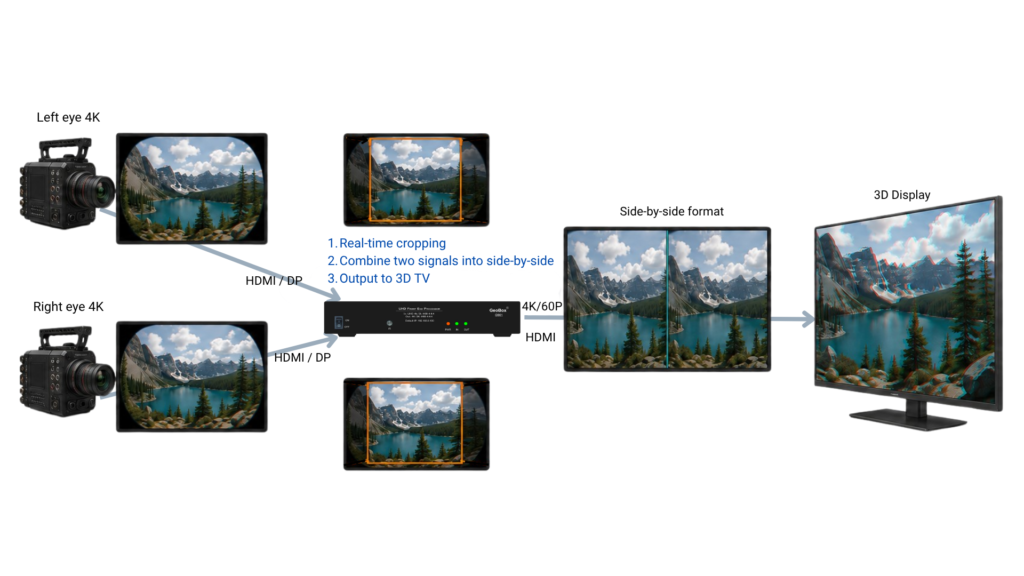
A practical hardware workflow for immersive camera signals
Immersive cameras often produce separate left-eye and right-eye video feeds. Displaying these signals on a 3D monitor may sound straightforward, but the actual requirement can involve several distinct steps:
- Cropping the required area from each eye
- Repositioning and resizing both images
- Combining them into a single side-by-side frame
- Determining whether the display also requires a 3D format flag
These are related tasks, but they are not the same operation.
A recent application involving a Blackmagic URSA Cine Immersive camera provided a useful example of how the workflow can be handled with GeoBox Baureihe G900.
The application requirement
The immersive camera generated two separate 4K video signals: one for the left eye and one for the right eye.
The customer did not want to display the complete images. Instead, the system needed to:
- Extract the central area from each video feed.
- Arrange the two cropped images next to each other.
- Create a single side-by-side output.
- Send the combined signal to an LG 3D TV.
Following the necessary signal conversion from the camera’s SDI outputs to a GeoBox-supported input format (HDMI or Display Port), the complete image-processing workflow was handled by GeoBox.
Cropping both the main and sub-window content
The left-eye and right-eye images could each be adjusted so that only the required central portion remained visible. The two cropped images were then resized and positioned through the PiP settings to create the final “side-by-side” composition.
The resulting workflow was:
Left-eye signal → crop central area
Right-eye signal → crop central area
Two cropped images → PiP positioning → side-by-side output
This allowed the system to create the required output directly in hardware, without depending on a PC-based composition application.
Side-by-side composition is not the same as 3D signalling
An important point clarified during testing was the difference between creating a side-by-side image und adding a 3D format flag.
In this application, the LG 3D TV only needed to receive the combined side-by-side image. The television could then display it using its own side-by-side 3D mode.
GeoBox therefore only needed to perform the PiP composition. No additional GeoBox 3D setting was required.
This distinction is important because the presence of a 3D display does not automatically mean that the video processor must generate a 3D flag.
Before configuring the system, the integrator should first determine what the downstream display actually expects:
- A normal video signal containing two side-by-side images
- And (or) a signal carrying an explicit 3D format flag
If only the first point is required, PiP composition is sufficient.
When a 3D flag is required
Some displays or downstream devices may require the signal to be identified explicitly as a 3D format.
In that situation, side-by-side composition and 3D signalling must be treated as two separate processing stages, hens, two processing channels will be needed.
The first processor crops and combines the left-eye and right-eye images:
Dual inputs → crop → PiP composition → side-by-side signal
The resulting side-by-side signal is then routed to another processing channel:
Side-by-side signal → 3D setting → output with 3D flag
When two processing channels are needed, both G902 or two units of G901 can perform the job.
Choosing the correct workflow
Before specifying the processor configuration, four questions should be answered:
- Do both eye signals need to be cropped?
If only part of each image is required, both the main window and the sub-window must be adjusted independently.
- Is a side-by-side picture sufficient?
Many 3D displays can accept a conventional side-by-side image and switch to the appropriate viewing mode internally.
- Does the display require a 3D flag?
If it does, an additional processing stage is needed after the side-by-side image has been created.
- What are the actual signal formats?
Input interface, resolution, frame rate, colour format and any SDI-to-HDMI or DisplayPort conversion must be confirmed before the system is specified.
A deterministic alternative to software-based composition
This application demonstrates how a relatively specialised immersive-camera workflow can be implemented without running the image composition on a computer.
GeoBox performs the required image extraction, resizing, positioning and side-by-side composition in dedicated hardware. Once configured, the processing does not depend on an operating system, application updates or a network connection.
This can be particularly useful in medical visualisation, research, training and other environments where the signal path must remain predictable and easy to operate.
The key is not simply selecting a processor with two inputs. It is understanding exactly what must happen to each image and whether the final display requires only a composed picture or additional 3D signalling.
With that distinction made, the system architecture becomes much clearer.