
How one GeoBox G901 and two M813 processors separate content logic from six-projector display geometry
Technical Requirements Overview
Immersive Sports Bar required one physical projection environment to support several operating modes. The system had to provide:
- one continuous immersive canvas
- multiple content sources
- multiple display formats
- multi-view layouts
- seamless switching between scenes
- six-projector geometry and edge blending
These requirements could not be handled by projection geometry alone.
The system needed two processing responsibilities to remain separate:
- content logic, handled before the projector-mapping stage
- physical display logic, handled at the six-projector output stage
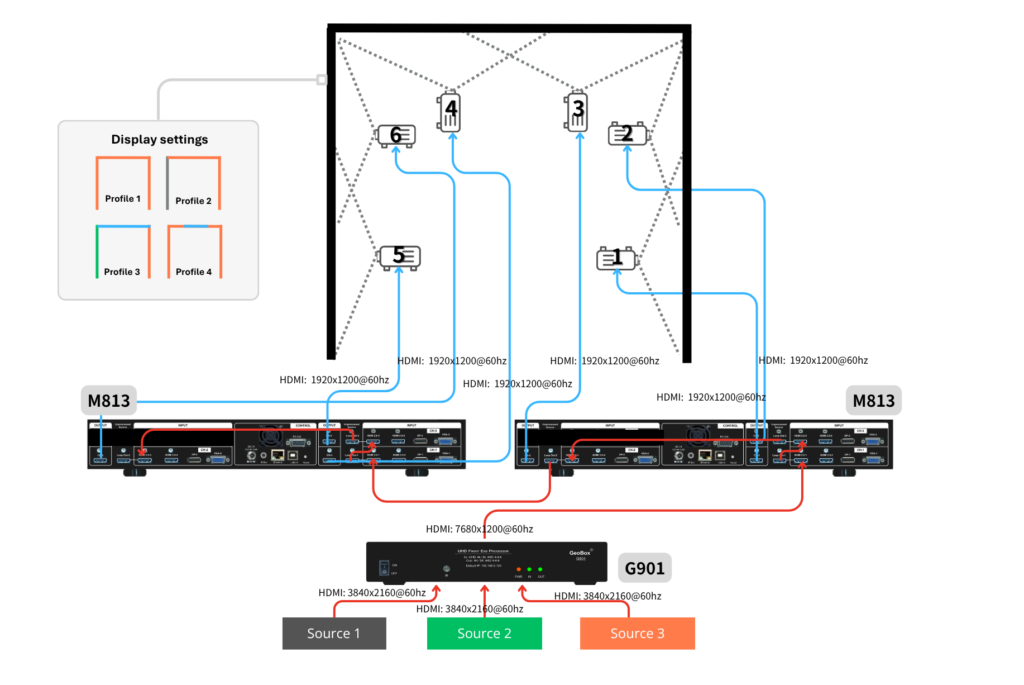
The final architecture combined one GeoBox G901 front-end processor, two GeoBox M813 multi-projector processors and six BenQ ultra-short-throw laser projectors.
Content Logic and Display Logic
The G901 operates at the front of the signal chain.
It manages the source and scene level of the system, including:
- source selection
- multi-view composition
- PIP and POP layouts
- split-view formats
- scene-level output preparation
- seamless switching between sources and display scenes
The G901 determines what the audience sees and how the available sources are arranged.
The two M813 processors operate after the G901.
Each M813 manages three projector channels. Together, the two units control all six BenQ UST projectors.
Their responsibilities include:
- image allocation
- geometry alignment
- warping
- overlap generation
- edge blending
- preservation of the calibrated projector topology
The M813 layer determines how the prepared scene is mapped across the physical six-projector environment.
The responsibility boundary is therefore clear:
The G901 controls the content logic. The two M813 processors control the physical display logic.
Benefits
Signal Chain
Content Sources → GeoBox G901 → 2 × GeoBox M813 → 6 × BenQ UST Projectors (refer to below picture)
The content sources may include live sports feeds, ambient visuals, sponsor content, private-event sources or themed content.
The G901 receives and arranges those sources into the required scene.
The two M813 processors then map that scene across the six projector channels while maintaining geometry, overlap and blending.
The six BenQ UST projectors create the physical image environment.
UST projection satisfies the practical requirement for large image coverage from a short installation distance. This is relevant in spaces where projector positions are limited or where the system must reduce the risk of shadows across the image.
Full Immersive Mode
In full immersive mode, the G901 selects or prepares one main scene.
That scene is passed to the two M813 processors, which allocate and map it across all six projector channels.
The M813 layer preserves:
- projector geometry
- image alignment
- overlap regions
- edge blending
The audience sees one continuous immersive canvas.
The content source can change without changing the physical projector calibration.
Multi-View and Multi-Source Operation
In multi-view operation, the G901 receives multiple sources and arranges them into the required display scene.
This may include:
- several sports feeds
- mixed live and ambient content
- private-event material
- sponsor content
- different layouts for selected walls or image areas
The G901 manages source selection, multi-view composition and seamless switching between prepared scenes.
The resulting scene is passed to the two M813 processors.
The M813 layer maps that scene across the calibrated six-projector environment while preserving geometry, warping, overlap and edge blending.
This allows the venue to move between one continuous immersive canvas and multiple content formats without rebuilding the six-projector geometry.
The simplified distinction is:
The G901 changes the scene. The M813 layer preserves the spatial mapping.
Why Engineering Skill Was Critical
The six BenQ UST projectors fulfilled the requirement for large images from a short installation distance.
The main calibration challenge came from UST projection’s sensitivity to wall-surface variation.
Because the image reaches the wall at a steep angle, even small deviations in flatness can create visible local geometry changes.
In a six-projector edge-blending system, these local deviations become more important because the edge of one projected image must align accurately with the overlap region of the next.
The engineer must evaluate:
- local wall-related distortion
- line straightness across image boundaries
- geometry differences inside overlap regions
- how one correction affects the adjacent image
- whether a correction should remain local or affect a wider area
- when mechanical repositioning is preferable to further digital correction
These decisions require experience, judgement and repeated on-site evaluation.
The successful implementation therefore depended heavily on Alexis and the Grupo Visual Canarias team, supported by imaginArt.
Their role was not simply to operate the processor. They had to understand how the six projected images interacted with the actual wall conditions and how each correction affected the complete environment.
How GeoBox Supported On-Site Fine-Tuning
The M813 processors provided the geometry and edge-blending controls used during calibration.
GeoBox did not remove the physical effects of wall-surface variation. Those conditions remained part of the installation.
Its value was to give the engineers a direct and intuitive way to fine-tune geometry while viewing the result in real time.
The adjustment workflow supported:
- four-corner alignment
- multi-point warping
- grid-line adjustment
- local geometry correction
- overlap positioning
- edge-blending refinement
This allowed the integration team to work directly at the projector-output layer.
When local distortion appeared, the team could identify the affected area, apply a geometry correction, observe the result immediately and check how the change affected the adjacent overlap.
This was especially important at image boundaries, where two projector images may appear acceptable individually but still show visible mismatch in the overlap region.
GeoBox provided the correction framework.
The final result depended on how effectively Alexis, Grupo Visual Canarias and imaginArt applied that framework to the actual room.
What Processing Could and Could Not Control
The responsibility boundary needs to remain precise. UST projection provided the required large image from a short installation distance. The G901 provided source selection, multi-view composition and seamless scene switching. The M813 processors provided six-channel geometry, warping, overlap and edge-blending control. The integration team provided mechanical positioning, calibration judgement, local correction strategy and final visual alignment. Processing could manage visible geometry. It could not make the wall physically flatter. The processors supplied the tools. The engineering team determined how those tools should be used.
System-Level Value
The combined GeoBox architecture separated changing content logic from fixed display logic.
This allowed the venue to maintain one calibrated six-projector environment while supporting:
- full-room immersive playback
- multiple source arrangements
- different display formats
- seamless transitions between scenes
- operation without rebuilding projector geometry for each use case
This separation is the technical reason the system could support different business scenarios within the same physical venue.
Lessons for System Architects
A multi-projector venue should not be designed only around its primary demo mode.
The expected operating modes should be translated into technical responsibilities before the signal chain is finalised.
For this type of system, several distinctions are important:
- scene composition is not the same as projector mapping
- seamless source switching is not the same as edge blending
- geometry processing does not replace installation quality
- UST projection requires careful on-site calibration
- changing content logic should not disturb fixed display geometry
In Immersive Sports Bar, the G901 and M813 processors formed complementary layers.
The G901 managed the content scene.
The M813 processors preserved the physical projection environment.
Alexis, Grupo Visual Canarias and imaginArt applied those tools within the actual conditions of the room.
Technical Short Answer
Immersive Sports Bar uses one GeoBox G901, two GeoBox M813 processors and six BenQ UST laser projectors. The G901 manages source selection, multi-view composition, multiple display formats and seamless switching between content scenes. The two M813 units manage the six projector channels, including geometry, warping, image allocation, overlap and edge blending. This separates changing content logic from the fixed physical projection topology, allowing one calibrated venue to support several operating modes.
Project Roles
- Business concept: Eloy González / Immersive Sports Bar
- System integration and installation: Alexis / Grupo Visual Canarias
- Technical support: imaginArt
- Projection: Six BenQ UST laser projectors
- Front-end content processing: GeoBox G901
- Six-projector geometry and blending: Two GeoBox M813 processors
Related Business Story
For the market thinking, customer experience and hospitality strategy behind the project, read:
One Venue, Multiple Business Modes: The Thinking Behind Immersive Sports Bar