
Alpha blending allowing transparent overlays to be seamlessly combined with the underlying video content in real time.
LED wall video processor
LED Wall Processor as a System-Level Technical Layer
Defining responsibility between content sources and LED controllers
Why Most LED Walls Fail Client Expectations
In an LED wall system, failures rarely originate from LED cabinets or controllers themselves. They occur when timing, synchronization, and signal behavior are not explicitly governed before content reaches the LED controller.
This page explains the architectural role of an LED wall processor as a technical layer responsible for stabilizing signal behavior upstream, ensuring predictable system performance after calibration.
“Why can’t we show multiple 4K sources on one canvas?”
“Why does the image stretch on this ultra-wide LED wall?”
“Why do laptops randomly go black or show the wrong resolution?”
“Why can’t we mix LED with LCD and projection in one workflow?”
💡The problem is not the LED wall. The problem is the missing processing layer between sources and the LED controller.
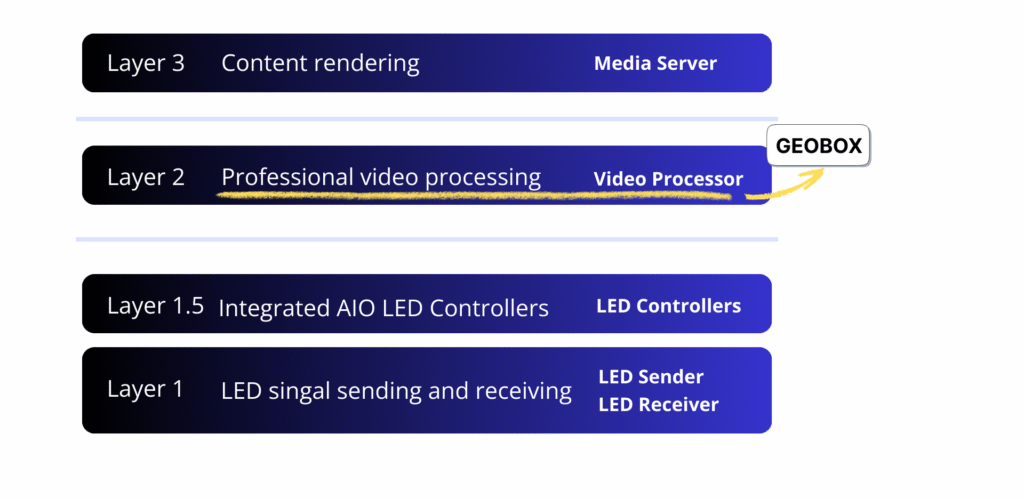
Where the LED Wall Processor Sits in the System
The LED wall processor operates between content sources and LED controllers. Its responsibility is not content creation, but signal normalization and enforcement. Once configured, it ensures that geometry, pixel mapping, frame timing, and synchronization remain fixed and repeatable, regardless of source changes or system restarts.
What This Layer Is Responsible For
- Enforcing deterministic frame timing before LED controllers
- Fixing geometry and pixel mapping after calibration
- Eliminating behavior changes caused by software state or OS scheduling
- Ensuring identical system behavior after every restart
What This Layer Does Not Replace
This layer does not replace LED controllers, media servers, or content workflows. It does not manage playback logic.
Instead, it ensures that all downstream systems receive stable, predictable signals, allowing those tools to operate as intended.
💡LED controllers make the wall light up.
Professional video processors make the content usable and reliable in real workflows.
LED Controllers vs. Professional Video Processors
LED controllers are excellent at driving LED modules.
Professional video processors are designed to prepare, shape, and manage signals before they reach the LED system.
| LED Controller (Sender / AIO) | Professional Video Processor (GeoBox) | |
|---|---|---|
| Primary Role | Pixel routing, synchronization, LED driving | Scaling, cropping, multiview, custom timing, switching |
| Sources | 1–2 basic inputs | Multiple UHD/4K inputs, BYOD ready |
| Layouts | Simple, fixed, limited PiP | Flexible multiview, custom layouts |
| Output Timing | Preset formats | Fully programmable custom resolutions |
| Technology Scope | LED only | LED + LCD + projection |
Download LED Wall Technical White Paper 📂
Get the full 16-page guide covering:
- The LED wall signal chain and four-layer ecosystem
- Common pitfalls in multi-source LED workflows
- Reference system designs using GeoBox S902 and G900 series
- Comparison between basic AIO controllers, GeoBox + sender, and high-end media servers
Typical Implementations
GeoBox processors are commonly used as this technical layer in large-scale LED wall systems where long-term stability and predictable behavior are critical.
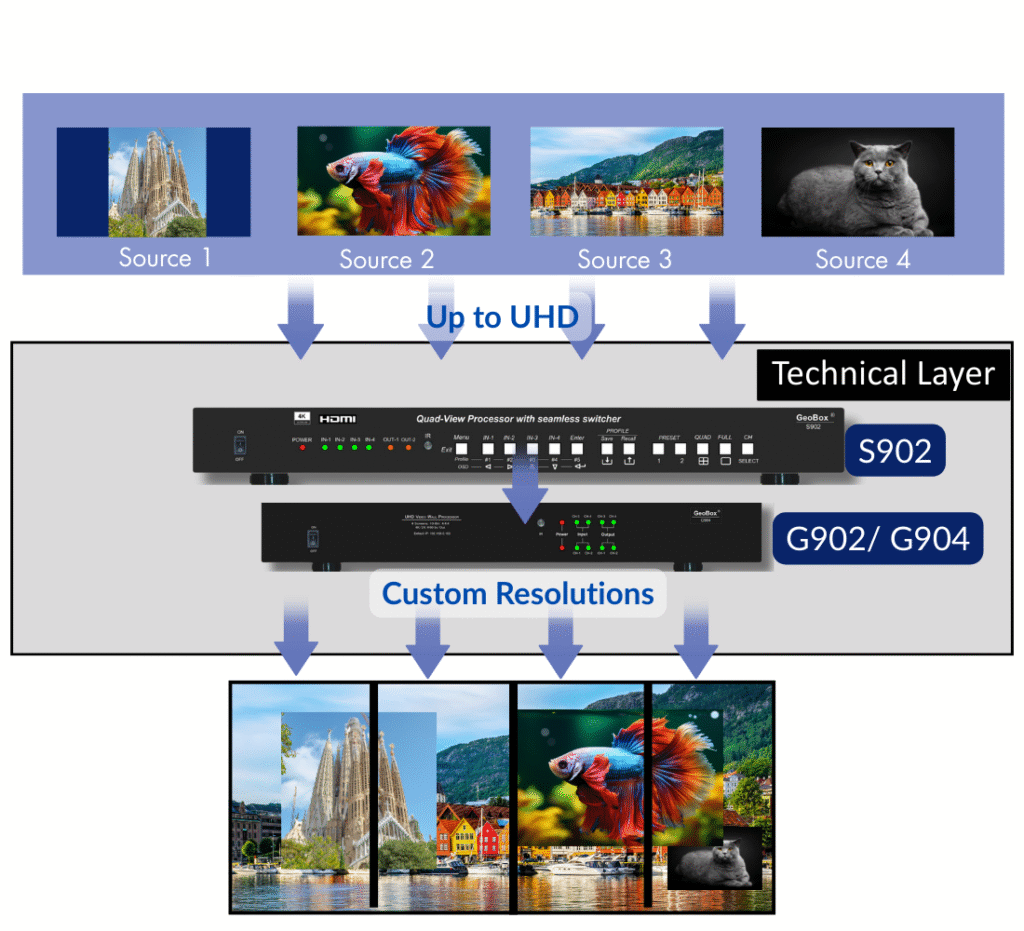
System Architecture Diagram:
- Multiple 4K sources combined into one canvas
- Custom resolutions generated per output
- Precise alignment across the entire display area
Core Processing
- Pixel-accurate scaling & cropping for non-standard LED canvases
- Custom timing for resolutions like 5120×1280, 1080×3840, and more
- Frame-locked outputs for stable multi-screen playback
Advanced Capabilities
- Multiple window layers from independant UHD input sources with flexible multiview layout editing.
- Zero-black seamless switching with fades and wipes
- Simultaneous LED + projection + LCD from one processing layer
- Near-zero latency (<1 frame) and 10-bit 4:4:4 hardware processing
-

Where an Open Processing Layer Makes the Difference
Museums & Exhibitions
Immersive exhibitions and cultural spaces often use non-standard LED canvases and mixed source and display technologies.
Commercial Spaces
Retail, corporate lobbies, and public displays require reliable multi-source presentation and consistent visuals.
Education & Trainings
Training centers, simulation rooms, and universities rely on synchronized, low-latency multi-source display.
Conference Rooms & Live Events
Meetings, auditoriums, hybrid events, and stages need smooth switching and stable source management.