
GeoBox: il livello mancante tra BrightSign e Epson Edge Blending
A recent four-projector installation started with what appeared to be a complete system:
- BrightSign XC4055 media player
- 4 × Epson EB-815E projectors
- An approximately 7000 × 1080 ultra-wide visual canvas
- Four projectors arranged horizontally
The original concept was simple:
BrightSign → Epson projectors
BrightSign would distribute the content across four outputs, while the Epson projectors would handle geometry correction and edge blending.
On paper, both ends of the system seemed covered.
BrightSign could provide the multi-output playback.
Epson could provide the projection alignment and blending.
But during system design, one important function was found to be missing:
Neither device was generating the duplicated image content required in the overlap between adjacent projectors.
That missing function eventually led to the addition of a GeoBox.
And this raised another question.
GeoBox is commonly associated with projector edge blending. If the Epson EB-815E already has built-in edge blending, why would a GeoBox still be needed?
The answer lies in understanding the difference between sfumatura dei bordi e preparing the image for edge blending.
The Problem Was Not Edge Blending
The Epson EB-815E already includes the tools required for the final projection stage, including:
- correzione geometrica
- sfumatura dei bordi
- colour matching
- black-level adjustment
So there was no need to duplicate those functions with an external warp-and-blend processor.
The problem existed one step earlier in the signal chain.
For two projected images to blend successfully, they must first contain a common section of source content.
Consider two adjacent projectors.
A normal image split would look like this:
Projector 1 image     Projector 2 image

|----------------|----------------|
                 ↑
             hard boundary
This is suitable for adjacent flat-panel displays.
But projector edge blending requires something different:
Projector 1 image
|-------------------|

             |-----------------------|
                 Projector 2 image
The two outputs must contain some of the same source pixels. (the red zone in above picture)
Those duplicated pixels are projected onto the same physical area.
Only then can the Epson projector reduce the brightness through the overlap region and visually merge the two images.
The edge-blending function therefore does not create the overlapping content.
It processes an overlap that must already exist.
Why BrightSign + Epson Alone Was Not Enough
The BrightSign XC4055 has four HDMI outputs and can distribute a larger canvas across multiple displays.
For a conventional four-screen installation, this can work very well. Each display receives its own part of the image.
The difficulty appears when the displays are projectors that need blending. Instead of four separate sections, the adjacent outputs must intentionally contain overlapping source regions. That is the missing processing step. The system therefore needed an intermediate device capable of determining:
which exact part of the source each projector should receive — including the pixels shared with its neighbour.
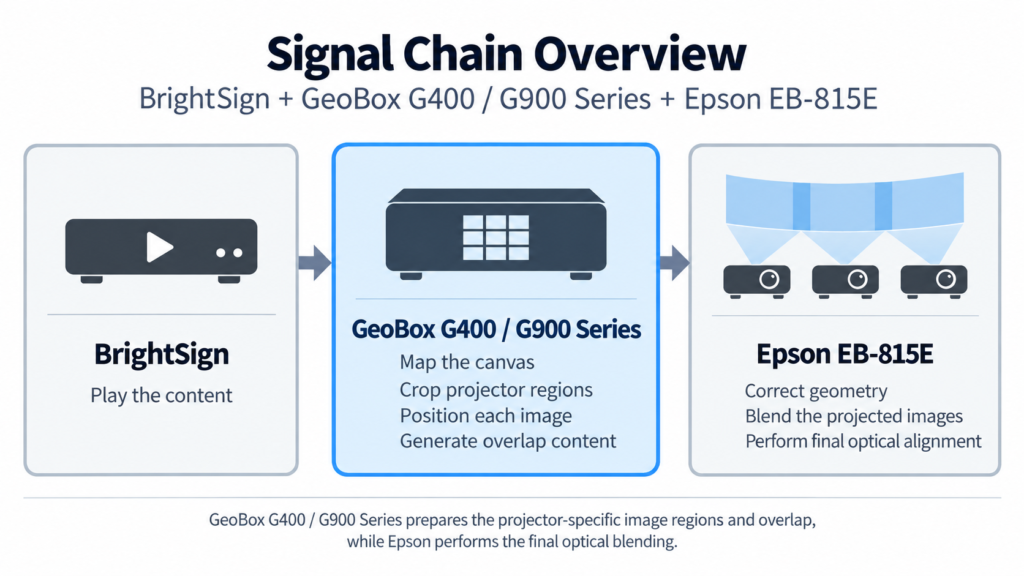
That became the role of the GeoBox.
GeoBox Fills the Missing Processing Layer
This is an important GeoBox application because it is not being used as the edge-blending processor. Instead, it prepares the source images required by the projector’s own edge-blending system.
For each output channel, the required part of the source image can be selected and adjusted independently:
- ritaglio
- image position
- ridimensionamento
- output orientation
- rotazione dell'immagine
- horizontal and vertical positioning
- overlap pixels
The result is not simply multiple equal pieces of one image. It is four projector-specific image regions.
Creating the Overlap
Imagine that projector 1 and projector 2 need a 250-pixel physical overlap.
A simple canvas split might be:
Projector 1:
0 ─────────────── 1920
Projector 2:
             1920 ─────────────── 3840
There are no common pixels.
The two images meet at a boundary, so there is nothing for the projectors to blend.
With GeoBox, the regions can instead be defined approximately as:
Projector 1:
0 ─────────────── 1920

Projector 2:
      1670 ─────────────── 3590
The source region from pixel 1670 to 1920 now exists in both outputs. That same visual content is projected by both projectors. The Epson can then apply its edge-blending curve across that physical overlap.
The responsibilities are therefore clearly separated:
| Function | Device |
|---|---|
| Content playback | BrightSign |
| Select projector image regions | GeoBox G400/ G900 |
| Generate shared overlap content | GeoBox G406 / G900 |
| Scale / position / rotate outputs | GeoBox G406 / G900 |
| Correzione della geometria | Epson |
| Miscelazione dei bordi | Epson |
| Colour and black-level adjustment | Epson |
Choosing Between G400 and G900 Series
The same system concept can be implemented with either the GeoBox G400 o Serie G900, depending mainly on the required input and output resolution. (Go to Serie G400, Serie G900.)
For applications using FHD/WUXGA projector outputs, the G400 series is normally sufficient. It supports high-resolution source signals while providing output resolutions up to 2048 × 1080 or 1920 × 1200. If the system requires UHD/4K output to each projector, higher-resolution signal processing, or more headroom for future display upgrades, the G900 series should be considered instead, with programmable outputs up to 4K/60.
In both cases, the engineering role discussed in this note remains the same: crop and map the canvas, create the required overlap content, and deliver the correct image region to each projector.
“But Epson Already Has Edge Blending — Why Use GeoBox?”
This is probably the most important question in this case. Because GeoBox is widely known for edge blending and geometry correction, there is a natural assumption that adding a GeoBox means those functions must also be performed externally.
That is not necessarily the case.
Different GeoBox product families solve different parts of the image-processing chain.
An M810 or UD100-series processor can perform full external geometry correction and edge blending.
A G400 or G900-series can instead be used further upstream as a canvas distribution and overlap-generation processor.
In this application:
Epson still performs the edge blending.
GeoBox simply gives Epson the correct images to blend.
Why This Can Be a Better Architecture
Trying to force every function into either the media player or the projector often makes the complete system harder to commission and maintain.
A more structured approach is to separate the system into three layers:
1. Content layer
BrightSign: Responsible for playing the intended visual content.
2. Image-distribution layer
GeoBox G400 or G900: Responsible for converting that content into the exact image regions required by the physical projector installation.
3. Projection layer
Epson: Responsible for correcting how those images land on the physical surface and blending the projected light.
This separation provides several practical advantages.
When Would a Full GeoBox Edge-Blending Processor Still Be Needed?
The G400 or G900-series plus projector-blending approach works particularly well when the projectors already provide suitable geometry and blending tools.
There are still many situations where an M810 or UD100-series processor is more appropriate.
For example:
- the projector has no edge-blending function
- projector geometry correction is insufficient
- the projection surface is highly curved or irregular
- geometry processing must be controlled centrally
- different projector models must behave consistently
The engineering decision should therefore begin with:
“Which processing functions are missing from the source-to-display chain?”
In this project, the missing function was neither playback nor edge blending. It was projector-specific image distribution with overlap content generation.
That is why G406 was the appropriate addition.
Engineering Takeaway
This project originally started with:
BrightSign + Epson
BrightSign could play and distribute the content. Epson could perform geometry correction and edge blending.
But there was a missing layer between them:
the generation of overlapping image content for adjacent projectors.
Adding the GeoBox G406 completes the processing chain.
The key lesson is that using GeoBox in a projection system does not always mean GeoBox must perform the edge blending.
Sometimes its most effective role is one step earlier:
preparing the correct images so that the projector’s own blending system can work properly.
In installations where the projector already provides capable warp-and-blend functions, this division of responsibilities can be both efficient and technically robust.
It avoids duplicating processing functions, keeps projector-specific mapping out of the playback system, and creates a clearer and more maintainable signal chain.
Further Reading
Why combine BrightSign with GeoBox in the first place?
This application focuses specifically on generating projector overlap content. For a broader look at how BrightSign and GeoBox can complement each other across multi-projector, video wall and LED display applications, read: La sinergia tra il lettore multimediale BrightSign e GeoBox