
G413
G413 ASYMMETRIC VIDEO WALL PROCESSING
Free-Angle Video Wall Processing for Creative Display Layouts
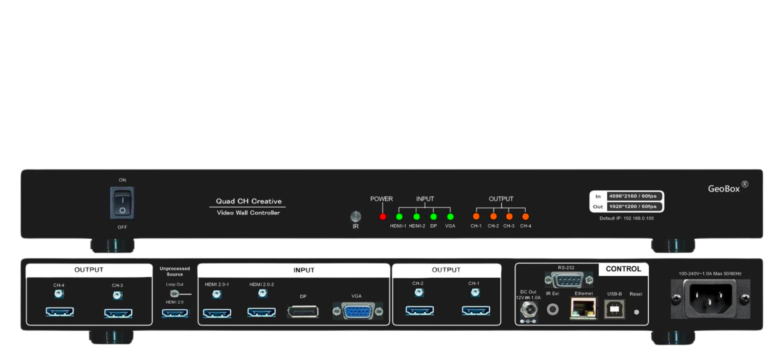
A dedicated hardware processor for building video walls where displays are installed at different angles, positions or orientations.
G413 maps one high-resolution source across up to four displays, with independent image cropping and positioning for each screen. Multiple units can be cascaded for larger installations.
FREE-ANGLE LAYOUT · 4 DISPLAY OUTPUTS · CUSTOM MAPPING · CASCADABLE
When the Video Wall Is Not a Standard Grid
Build compositions where screens are installed at different angles, offsets or positions instead of following a conventional rectangular matrix.
Turn standard commercial displays into architectural visual elements while keeping content playback separate from the physical screen arrangement.
Create visually distinctive display installations and recall different presentation modes without rebuilding the source content.
Custom display modes can accommodate screens with different dimensions, bezel characteristics and physical positions within the same composition.
What G413 Does
Build the Video Wall Around the Display Design
Conventional video wall processors assume that displays are arranged in a regular horizontal or vertical matrix. G413 is designed for layouts where screens can be positioned at different angles, offsets and locations.
Each display is assigned its own region of the source canvas and mapped according to its actual physical position. This allows one continuous image to follow an asymmetric or free-angle display arrangement without requiring the content itself to be pre-rendered for that exact screen geometry.
The source remains responsible for content playback. G413 handles the display-side mapping, cropping, scaling and synchronization.
Fit the image to the physical display layout
Define the position and angle of each display within the overall canvas, then independently crop and scale the required source region for each output.
This allows one continuous source image to follow asymmetric, staggered or angled screen arrangements without pre-rendering content specifically for the installation.
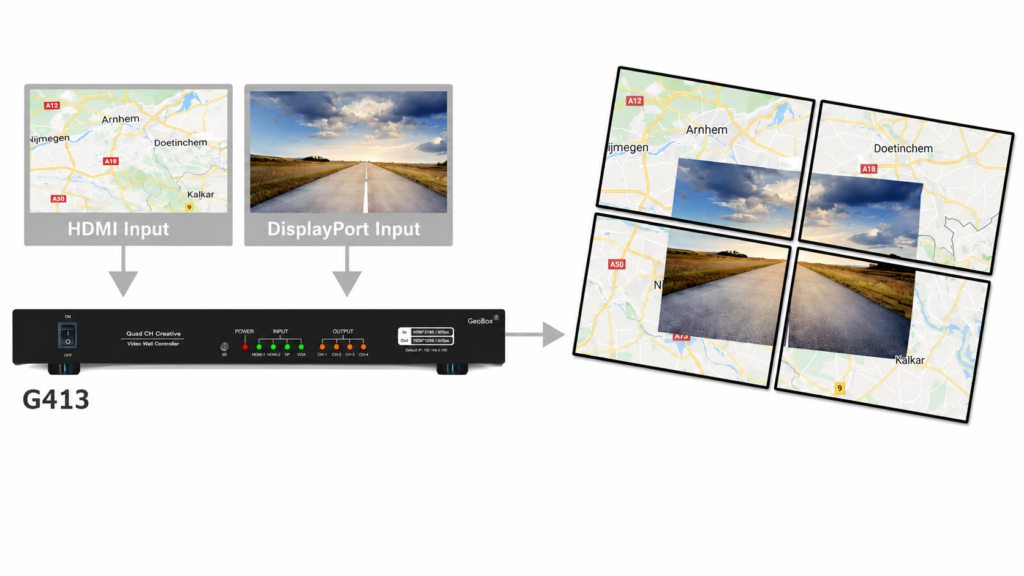
Combine two sources within the video wall
Display two independent sources using Picture-in-Picture or Picture-outside-Picture layouts.
PIP allows a secondary source to be freely positioned and resized over the main image, while POP supports side-by-side or top-and-bottom presentation across the display canvas.
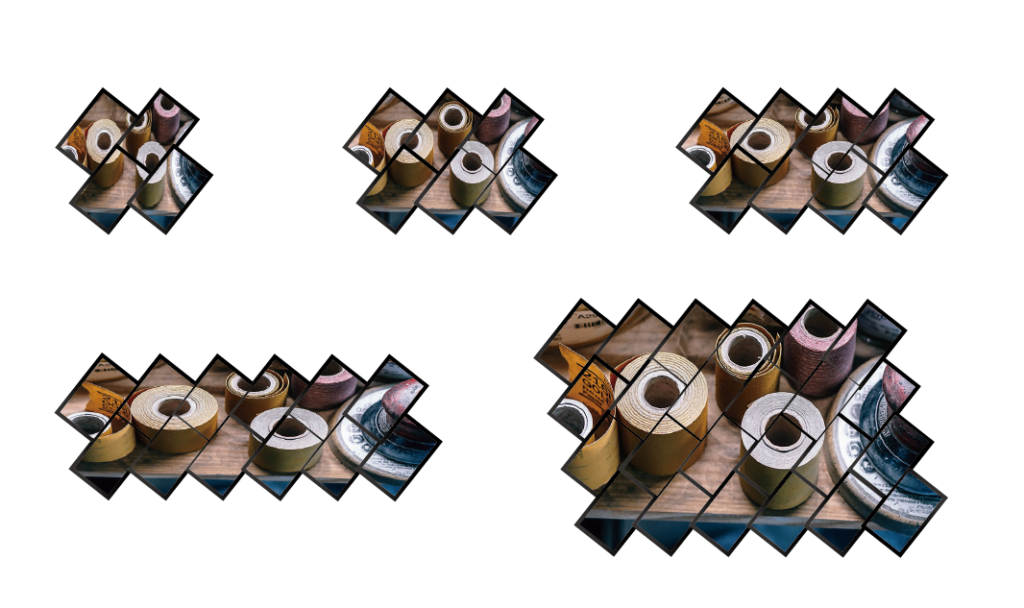
Scale from four displays to larger installations
Four processed outputs remain synchronized, while HDMI loop-through allows additional G413 units to extend the same source across larger walls.
Hardware Processing Designed for Professional AV
Up to 4K60 Input
Supports digital input up to 4096 × 2160 @ 60 Hz.
4 FHD / WUXGA outputs
Four independently processed HDMI outputs support professional Full-HD and WUXGA-class displays.
4:4:4 Processing
Full-bandwidth RGB 4:4:4 video processing with a 10-bit processing engine.
SYNCHRONIZED OUTPUTS
Output channels remain synchronized to maintain image continuity across adjacent displays.
Designed for Fixed, Repeatable AV Installations
Editable Display Modes
Start from a Preset or Build Your Own
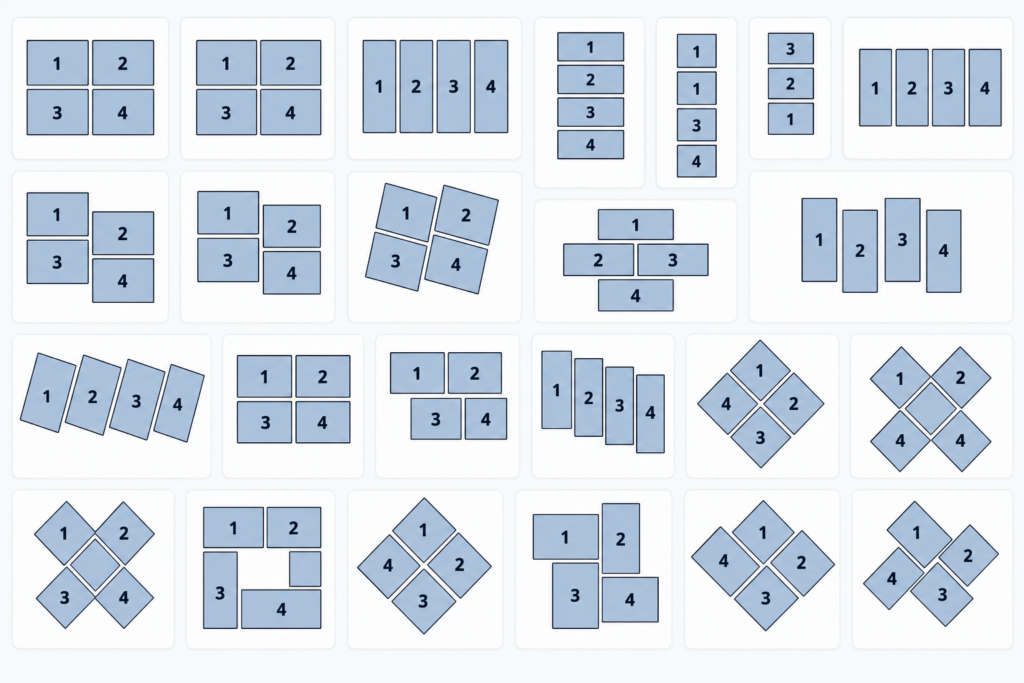
G413 includes 27 preset display modes for common creative arrangements. Preset layouts can be further adjusted to accommodate the actual display position and bezel conditions.
For completely custom installations, the user can define a new arrangement based on the real physical location of each screen.
MULTIPLE MODE LOOP PLAYBACK
Create dynamic presentations from the same content
Save multiple display layouts and play them back automatically in a continuous loop at user-defined intervals.
By changing how the same source content is cropped, positioned and arranged across the displays, G413 can create more dynamic and visually engaging signage without requiring multiple versions of the media.
Standalone Configuration
Image cropping, mapping and settings can be configured directly through IR controller or the dedicated PC tool (GAlign2).
5 USER PROFILES
Recall complete system settings instantly
Save up to five user profiles for quick recall of different operating scenarios. Each profile can store the selected input source together with video-wall and PIP/POP settings, allowing the G413 to switch rapidly between predefined presentation configurations without rebuilding the setup manually.
One Processing Channel per Projector
A G112 is installed in front of each projector.
For a multi-projector system, the source signal is distributed to multiple G112 processors using an HDMI distribution amplifier or splitter.
Each G112 then performs the processing required for its own projector.
Up to 4K60 / 7680 × 1200 @ 30Hz
PIP / POP · Frame Sync
Choose G413 When
- Displays are installed at non-standard or arbitrary angles.
- The video wall is asymmetric rather than a conventional rectangular grid.
- PIP / POP or timed layout changes are required.
- The physical display layout should remain independent from content creation.
Consider Another GeoBox
Displays only require 0° / 90° / 180° / 270° orientation?
G400 Series
Better suited to conventional multi-display walls requiring more output channels, cropping, rotation and independent display control.
Need UHD / 4K output to each display?
Choose G900 Series →
Designed for 4K/UHD output, programmable output resolution and specialist display timing requirements.
Explore G900
Need freely positioned multi-source windows?
Add S902 →
Use S902 when multiple independent live sources need to be freely positioned, resized or layered before the signal reaches the video-wall processor.
Explore S902
Technical Specifications
Detailed signal, processing, control and mechanical specifications for system design and integration.
Video Input
Vertical: 720–2400 pixels
DisplayPort: HDCP 1.4
Video Output
Up to 2048 × 1080 @ 60Hz
Image Processing & Video Wall
System & Control
Mechanical
G413 in Real Installations

HOSPITALITY · ITALY
Creative Video Wall at Andreus Resorts
A creative display installation where the physical orientation of the screens becomes part of the visual design. G413 allows the source content to be mapped across the asymmetric screen arrangement while keeping display processing independent from content playback.
Technical Resources
GAlign2 PC tool
PC configuration tool for custom display positioning and layout setup.
Planning an Asymmetric Video Wall?
Send us the number of displays, panel sizes, source resolution and a simple drawing or photograph of the intended layout.
We can review the display geometry and recommend the appropriate G413 configuration and cascade architecture.