-
Technische Artikel
-
- Die Zukunft des Lernens erschließen
- Von Texel zum Technologieführer: MAV Mike Dijker's ProAV Vermächtnis (Niederlande)
- Zukunftsweisende Innovation: Eine Reise mit Peter Hazenberg, dem Gründer von VideobriX
- GeoBox enthüllt die Zukunft der Neurochirurgie mit 3D-Technologie: Interview mit Professor Wolfsberger (Österreich)
-
- MSFS 2024 trifft auf GeoBox M813: Der ultimative Leitfaden für immersive Flugsimulationen
- So verwenden Sie ChromeBox für die immersive Darstellung
- Verbesserung des visuellen Erlebnisses in Museen durch immersive Projektionstechnologie
- S902, Verbessern Sie die Wirksamkeit Ihres Großbildsystems
- Perfektionierung großer Wanddisplays
- Ein Leitfaden für die mühelose Einrichtung eines immersiven Erlebnisses in 5 Minuten
- Die Synergie der Verwendung von BrightSign Player mit GeoBox video Controller
- Nahtlose Kantenüberblendung: GeoBox's Black Level Uplift Lösung für AV-Profis
- GeoBox Neue Serie 810: Hervorragende Pro-AV-Leistungen
- Synergie von Digital Signage Player und Video Controller
- HDMI-Technologien und -Kabel: Ein Leitfaden für professionelle AV-Techniker
- Enthüllung der GeoBox Mini-Kantenglättungs- und Verformungsbox: G111 / G112
- Die neue Reihe von All-In-One-Lösungen für das Kantenmischen - Serie M810
- GeoBox im ISE2022
- G901, Allround-Mehrzweck-Controller: Multiviewer, ultrahohe Auflösung, 3D, nahtloses Umschalten & mehr.
- Eine bessere Lösung für Ihr Kantenüberblendungs-Projekt (Edge-Blending) mit mehreren Projektoren
- Unterstützung von 8K-Eingangstiming in allen GeoBox-Lösungen
- Wie disponiert manein großes Bild mit mehreren Projektoren?
- Epson x GeoBox 8K/4K Demo-Veranstaltung
- 4K-Beamer Kantenüberblendung (Edge Blending) und geometrische Bildkorrektur (Warping)
- 4K-Beamer Kantenüberblendung (Edge Blending), Warping-Controller
- Immersive Display-Lösung
- Wie plant man ein großes Projektionssystem?
- GeoBox G901 4K60hz Ein- und Ausgabeprozessor ist jetzt in Europa erhältlich
- Projektionskartierung für das Museum
- Projection Mapping-Technologie von GeoBox
- Edge-Blending-Rechner für die Planung von Multiprojektorprojekten
- Zuverlässige Hardware-basierte Videoverarbeitung für professionelle AV-Installationen
- Alle Artikel anzeigen (13) Artikel kollabieren
-
- So verwenden Sie ChromeBox für die immersive Darstellung
- Digitale Kunst für die Sonderausstellung "Unersetzliche Dinge - Erde, Landschaft und Umwelt" des Karuizawa New Art Museum's
- S902, Verbessern Sie die Wirksamkeit Ihres Großbildsystems
- Perfektionierung großer Wanddisplays
- Die Synergie der Verwendung von BrightSign Player mit GeoBox video Controller
- Synergie von Digital Signage Player und Video Controller
- HDMI-Technologien und -Kabel: Ein Leitfaden für professionelle AV-Techniker
- GeoBox im ISE2022
- G901, Allround-Mehrzweck-Controller: Multiviewer, ultrahohe Auflösung, 3D, nahtloses Umschalten & mehr.
- Unterstützung von 8K-Eingangstiming in allen GeoBox-Lösungen
- 4K in-out Video Wall Controller mit Multiviewer - 'Weltneuheit'
- Videowand-Controller: Die 5 wichtigsten Gründe für den Einsatz
- GeoBox G901 4K60hz Ein- und Ausgabeprozessor ist jetzt in Europa erhältlich
-
-
Neue Briefe
-
Referenzen
-
- Esports AV-Integration vom Feinsten: GeoBox steuert das ZOWIE Gaming Experience Center
- Immersive Kunst in neuen Dimensionen: GeoBox im Le Space von Hyundai Futurenet
- GeoBox verändert die Innenarchitektur durch immersive Technologie (Andalusien, Spanien)
- Lifesize Plans - Revolutionierung der Architekturvisualisierung
- Immersive Fusion: Die technologische Kreativität von Ragdale Hall Spa's Thought Zone
- Hoffnung erhellen: Das Hanbit-Turm-Weihnachtsprojekt (Korea, 2020)
- GeoBox Projektionskartierung in Japan Kyoto Kodai-ji-Tempel
- Ein neues Einkaufserlebnis: IKEA's immersive Technologie im Herzen von Paris (Frankreich)
- 125 Jahre BOSCH in Großbritannien: Angetrieben von GeoBox und Panasonic
- Sony Professional Display auf der OMR 2023 (Hamburg, Deutschland)
- Das Holodeck: Ein futuristischer Tagungsraum
- Wie G413 das Gästeerlebnis in den luxuriösen Andreus Resorts verbessert
- Eintauchen in das Yoga-Studio
- GeoBox erweitert den Vodafone-Flagship-Store in den Niederlanden um die Interaktion mit dem Rand
-
- Die Wiederentdeckung des Himmels: Flugsimulator zum Leben erweckt mit GeoBox-Technologie
- Die Zukunft des Lernens erschließen
- Projektionsbasiertes immersives Lernen: JETZT und die Zukunft der allgemeinen und beruflichen Bildung
- GeoBox enthüllt die Zukunft der Neurochirurgie mit 3D-Technologie: Interview mit Professor Wolfsberger (Österreich)
- Erstellung einer Großprojektion im Schultheater für verschiedene Zwecke (Niederlande)
- Secta Immersive verbessert Schulungen in immersiven Räumen mit GeoBox
-
- GeoBox und Panasonic-Projektoren tauchen Kuala Lumpur in ein neues Licht
- Immersive Kunst in neuen Dimensionen: GeoBox im Le Space von Hyundai Futurenet
- Immersive Multimedia-Installation im Museo del Lago - Montemurro (Italien)
- Digitale Kunst für die Sonderausstellung "Unersetzliche Dinge - Erde, Landschaft und Umwelt" des Karuizawa New Art Museum's
- Verbesserung des visuellen Erlebnisses in Museen durch immersive Projektionstechnologie
- Museen im digitalen Zeitalter: Herausforderungen angehen und vom Teylers Museum lernen (NL)
- GeoBox wertet historische Wahrzeichen durch Immersion auf: Fort Victor Emmanuel (Frankreich)
- Eine Reise ins immersive Aquarium: Die Tiefe (Hull, UK)
- 125 Jahre BOSCH in Großbritannien: Angetrieben von GeoBox und Panasonic
- Verewigung des Medienerbes im Medienmuseum (Hilversum, NL)
- Medienmuseum Sound & Vision in den Niederlanden
- Eintauchen in die Geschichte mit Geobox (Brügge, Belgien)
- Immersive Projektionsinstallation in der Schweiz
- GeoBox unterstützt den slowakischen Pavillon auf der EXPO2020
- Erleben Sie die F-16 im Nationalen Militärmuseum (Soest, Niederlande)
- Mori Building Museum für digitale Kunst: Epson teamLab Grenzenlos
- Die 10. jährliche Korea Gyeongju World Culture Expo
- Projektionskartierung für das Museum
- GeoBox erschafft im Stuttgarter Linden-Museum die fünfte Aztekensonne
- Entdeckung der Bildkontrolllösung hinter Digital Art Museum
- Alle Artikel anzeigen (5) Artikel kollabieren
-
Pixel-to-Pixel Projection Mapping
How to achieve true 1:1, distortion-free mapping in multi-projector systems
When people say “projection mapping,” they often mean “make it fit the surface.” But in museums, architectural visualization, simulators, showrooms, and any environment with text, UI, drawings, or fine lines, “it fits” is not enough. The real requirement becomes:
1:1 pixel mapping (pixel-to-pixel): the content pixels arrive at the display canvas without being silently rescaled, re-sampled, or softened by hidden steps in the pipeline.
This article frames 1:1 mapping as a responsibility boundary problem inside complex display systems, and compares two common approaches:
- GeoBox hardware processing (FPGA-based technical layer)
- Other camera-calibration software (PC/GPU-driven mapping layer)
Why “1:1” fails in real projects
1:1 rarely fails because someone forgot a menu option. It fails because multiple layers each do “a little scaling”:
- OS or GPU scaling overrides your “custom” output
- The media server outputs a “standard” raster that does not match the effective blended canvas
- Warping is applied on top of a mismatched raster, forcing interpolation
- Overlap (edge blending) changes the effective canvas width, so the “math” is wrong from the start
If your system is doing any of the above, your “mapping” may still look aligned, but it will not be pixel-pure.
1:1 is a Technical Layer decision
At GeoBox, we treat complex display as a layered system. 1:1 is achieved only when the responsibility boundaries are explicit.
Layer model (simple but practical)
Content and Compute Layer
Media server, PC, player, real-time engine, content generation.
Technical Layer (signal orchestration)
Resolution enforcement, pixel allocation, deterministic processing, geometry correction, blending, synchronization.
Display and Optics Layer
Projectors, lenses, surface, mounting tolerances, environmental drift.
GeoBox lives primarily in the Technische Ebene as an external hardware node, separating “content creation” from “display topology.”
Software based solution often extends the Compute Layer pushing geometry, blending and mapping into the PC/GPU domain.
The difference is not a feature checklist. It is where the system takes ownership of pixel accuracy.
GeoBox 1:1 (Distortion-Free) Workflow
A content-preparation view, with a clear Technical Layer responsibility boundary
GeoBox makes distortion-free “1:1” projection mapping straightforward by moving the complexity downstream into a dedicated Technische Ebene. The content side only needs to deliver one single canvas that matches the aspect ratio of the combined display area. Everything else (how that canvas is implemented across multiple projectors) is handled in the processing layer.
- Define one simple content contract: the combined display aspect ratio
Start from the final target surface (the combined display area). Measure or define its aspect ratio (e.g., 5:1). This ratio becomes the only requirement for content creation. - Create content in the same aspect ratio (resolution can vary)
As long as your content is produced in the same aspect ratio as the combined display area, the system will not introduce geometric stretching (no horizontal/vertical distortion). The input resolution can change across different players or media sources, but the aspect ratio remains consistent. - Enforce predictable fill behavior with GeoBox “Full Screen” + geometric alignment
Set GeoBox to the selectable “Full Screen” mode so the content always fills the output frame in a consistent, controlled way. Then use GeoBox’s basic yet powerful geometric alignment to reshape each output image to the target boundary without changing the content’s aspect ratio.
This is the key reason the workflow stays simple: the system scales uniformly (aspect-correct), rather than letting different layers apply non-uniform scaling that causes distortion. - Validate “no distortion” on-site, then lock it as a repeatable profile
Use a simple geometry test pattern (circles, squares, grids). If circles remain circles and grids remain proportionate across the full canvas, you’ve verified distortion-free behavior. Save the setup as a recallable profile so the same aspect-correct mapping can be restored instantly after maintenance, signal changes, or power cycles.
Technical honesty (one sentence that prevents confusion):
“Distortion-free 1:1” here means no aspect-ratio distortion (no stretching/squashing). Image sharpness still depends on pixel density (how many pixels you feed versus how large the wall is).
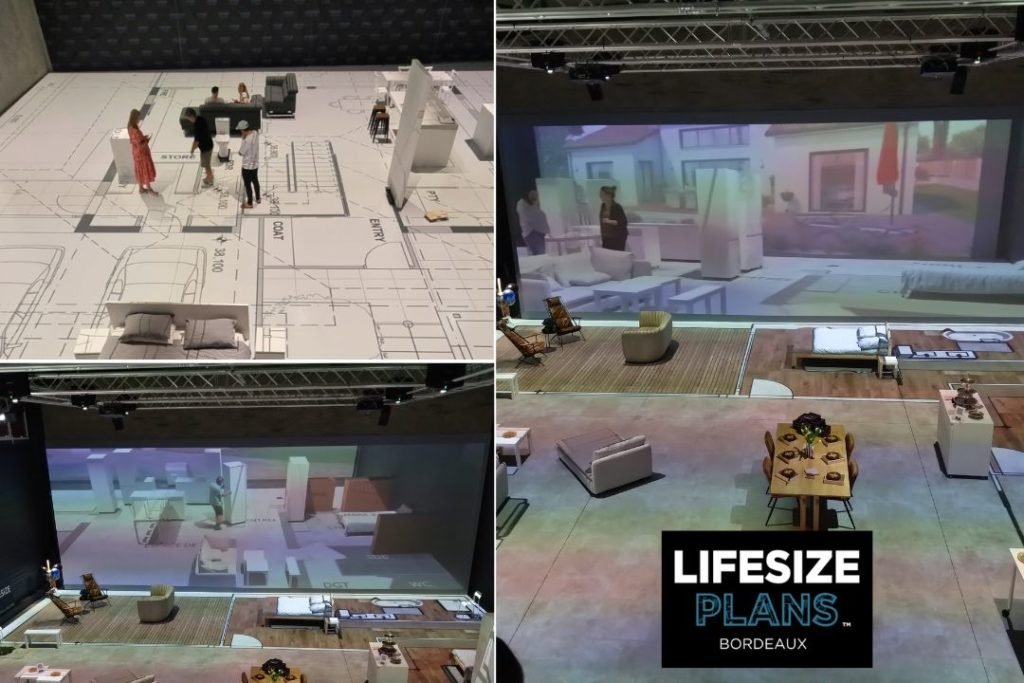
Implementation Reference: Lifesize Plans Bordeaux (True-to-Scale Architectural Projection)
Lifesize Plans Bordeaux is a practical example of why “1:1 distortion-free” is not a calibration trick, but a system responsibility boundary.
The project targets a true-to-scale architectural experience using GeoBox Edge blending processor in combination with a large multi-projector array (12 high-brightness Christie DWU projectors).
What this implementation proves:
- One canvas, one contract: content is produced to match the combined display area aspect ratio, so the system never needs non-uniform scaling (no stretching/squashing).
- Output-side determinism: GeoBox in Vollbild behavior keeps “fill” predictable, while geometric alignment is applied downstream in the Technical Layer.
- Repeatability, not hero work: once validated with simple geometry/scale checks, the setup is saved as a recallable profile, so the system can return to the same distortion-free state after maintenance or source changes.
If you want to see how this logic is implemented in a real architectural visualization environment, read the case study: “Revolutionizing Architectural Visualization: Lifesize Plans Bordeaux.”